We’re always looking for ways to improve and make our platform even better for you!
If you have a feature in mind that’s not currently available in the app, we’d love to hear about it.
To submit a request, simply fill out our Feature Request Form by clicking the submit button below. This form allows you to share your idea directly with our product team, helping us better understand your needs and prioritize future updates.
How to Submit a Feature Request
Access the Feature Request Form. by clicking the submit button below.
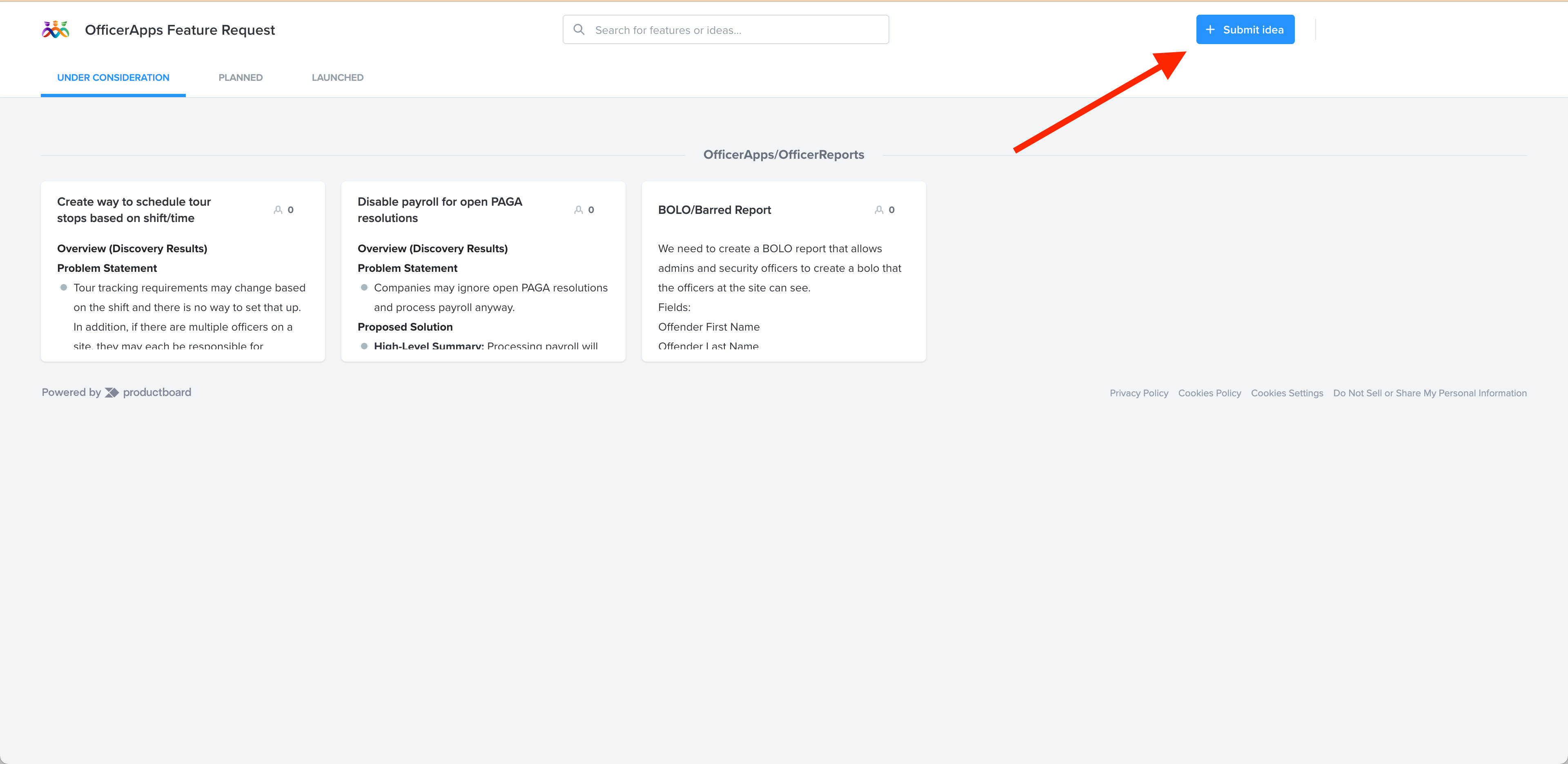
Once you are on the Feature Request board feel free to review the current features being requested or submit a new feature request by clicking the submit idea button in the top right corner.
Provide the following information:
A clear description of the feature you’re requesting.
Any examples or use cases that explain how it would improve your experience.
Submit the form.
If requested, please verify the email address that you use when submitting the request. Without verifying the email address, we will not receive your request.
Once your request is submitted, our product team will review it. While we can't guarantee every request will be implemented, we carefully evaluate all submissions when planning new features and improvements.

Was this article helpful?
That’s Great!
Thank you for your feedback
Sorry! We couldn't be helpful
Thank you for your feedback
Feedback sent
We appreciate your effort and will try to fix the article